Custom loggers
Loggers serve as valuable tools for visualizing and analyzing algorithms in real-time during the training process. They enable users to monitor observations passed to the agent, the agent’s state, and basic metrics.
Key concepts of loggers
A basic concept of loggers is the “source”. Sources are objects that can be logged. There are three types of sources:
observation - value passed to the agent, such as the current state of the environment,
state - value that is stored in the agent, for example, the array of Q-values,
metric - value that is calculated during the training process, such as the cumulative reward.
Sources are represented by a string or a tuple (str, SourceType), where str is a name of the source,
and SourceType is an enum that specifies the type of the source. The enum has the following values:
SourceType.OBSERVATION- the source is an observation passed to the agent,SourceType.STATE- the source is the agent’s state,SourceType.METRIC- the source is a metric.
When creating an instance of the RLib class, users can specify the sources using the logger_sources parameter.
For example:
rl = RLib(
    agent_type=EGreedy,
    agent_params={'e': 0.25},
    ext_type=RecommenderSystemExt,
    logger_types=PlotsLogger,
    logger_sources=[('action', SourceType.METRIC), ('cumulative', SourceType.METRIC)]
)
The above example demonstrates a logger of type PlotsLogger with two sources: action (representing the
last action taken by the agent) and cumulative (representing the cumulative reward). These values will be
logged each time the agent takes an action and receives a reward.
Users can use multiple loggers simultaneously by specifying a list of logger types in the logger_types
parameter. For instance:
rl = RLib(
    ...
    logger_types=[PlotsLogger, CsvLogger, TensorboardLogger],
    logger_sources=[('action', SourceType.METRIC), ('cumulative', SourceType.METRIC)]
)
In this example, three loggers (PlotsLogger, CsvLogger, and TensorboardLogger) are used, each logging
actions and cumulative rewards.
Users are not restricted to predefined sources and can log any value using the log method of the RLib class.
The log method takes two parameters: name and value. The example below shows how to log a value from a
custom source:
rl = RLib(
    ...
    logger_types=[TensorboardLogger, StdoutLogger]
)

for _ in range(epochs):
    ...
    rl.log('Epoch len', epoch_len)
Note that the log method does not take the SourceType parameter. In the provided example, all loggers
will log all the custom values passed to the log method.
Loggers can be used to log values of different types. The base interface of loggers provides the following methods:
log_scalar- logs a scalar value,log_array- logs an one-dimensional array,log_dict- logs a dictionary,log_other- logs a value of any other type.
The LogsObserver class is responsible for selecting the appropriate method of the logger
for a given value based on its type.
Loggers can take a variety of parameters. The user can specify these parameters while creating an instance of
the RLib class by using the logger_params parameter. Note that the parameters are passed to instances of
all loggers listed in logger_type, so the user should choose appropriate parameter names not to interfere
with other loggers.
One of the important concepts of loggers is the synchronization of the logged values. It is important when some
values are logged more often than others. Different loggers handle the synchronization in different ways. Below
you can find an illustrative example of the synchronization with the PlotsLogger:
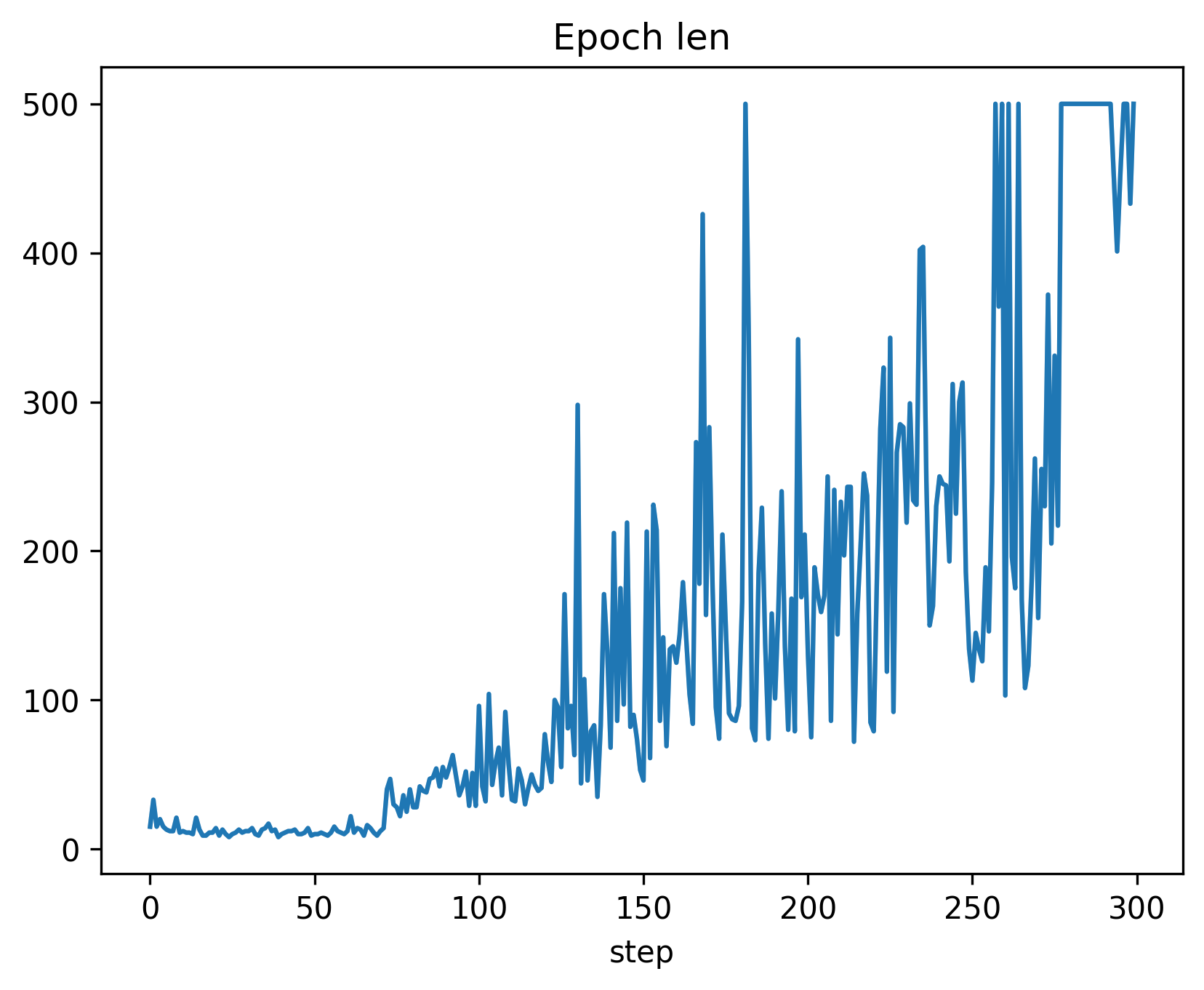
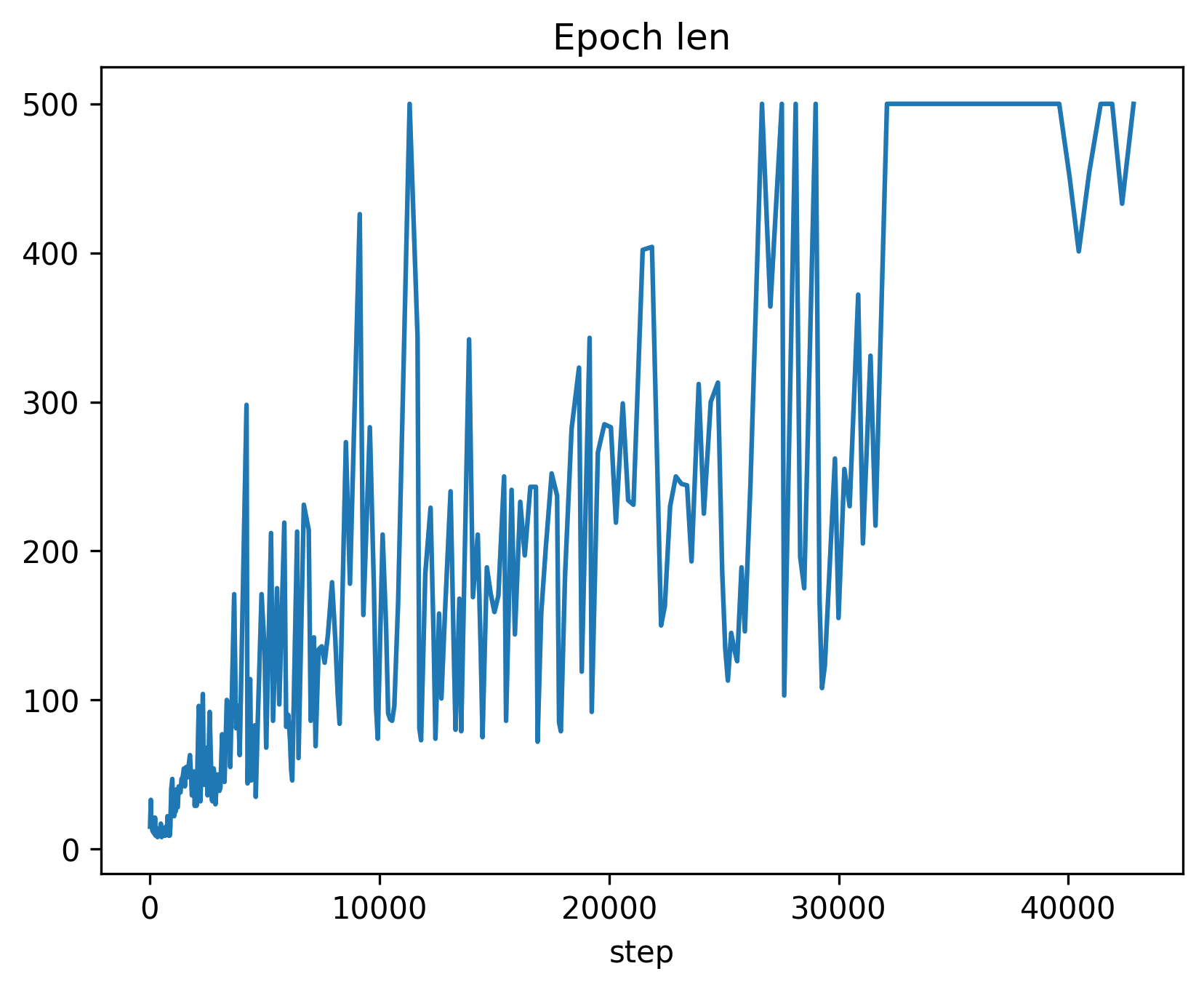
The first image depicts the plot of epoch length without synchronization, where the value is logged 300 times (once per epoch). In contrast, the second plot shows the same value logged more than 40,000 times (once per step) with synchronization.
Implementing new loggers
To create your own logger, you should inherit from the abstract class BaseLogger.
We will present creating a custom logger on the example of the CsvLogger logger:
class CsvLogger(BaseLogger)
To begin, we need to create a constructor for the loggers. The __init__ function is capable of accepting various
arguments, which can be later provided through the logger_params parameter within the RLib class constructor. Always ensure to include **kwargs in the arguments list to disregard parameters used by other
loggers. It is crucial to choose appropriate parameter names, considering they will be passed to instances of all
loggers mentioned in logger_type. For instance, constructor parameters of PlotsLogger should with the
prefix plots_*, while parameters of CsvLogger start with csv_*. Below, you’ll find an example constructor
of CsvLogger:
def __init__(self, csv_path: str = None, **kwargs) -> None:
    super().__init__(**kwargs)

    if csv_path is None:
        csv_path = f'rlib-logs-{timestamp()}.csv'
        csv_path = os.path.join(os.path.expanduser("~"), csv_path)

    self._csv_path = csv_path
    self._current_values = set()
    self._step = 0

    self._values = defaultdict(list)
    self._steps = defaultdict(list)
The essential logger methods consist of several functions serving the purpose of logging scalar values, arrays,
dictionaries, and other objects. Handling the transmission of logged values to the corresponding methods is the
responsibility of the LogsObserver class. To enable our logger to record values of a
specific type, we must override the appropriate methods. For instance, let us examine the log_scalar and
log_other methods of CsvLogger:
def log_scalar(self, source: Source, value: Scalar, *_) -> None:
    self._log(source, value)

def log_other(self, source: Source, value: Any, *_) -> None:
    self._log(source, f"\"{json.dumps(value)}\"")

def _log(self, source: Source, value: any) -> None:
    name = self.source_to_name(source)

    if name in self._current_values:
        self._step += 1
        self._current_values.clear()

    self._current_values.add(name)
    self._values[name].append(value)
    self._steps[name].append(self._step)
These are simple methods that log scalars and values of other types. The log_scalar function just takes the
raw scalar and saves it with a method _log of CsvLogger. Similarly, the log_other function
converts a given value to the JSON format and then calls _log. The _log method saves the value to the
_values dictionary and controls the _step variable. The _step variable is used to determine the
current step of the logged value.
Note the use of the source_to_name method of BaseLogger that converts that source to a string.
If the source is a string (just a name of an observation, state, or metric), the method returns that string.
Otherwise, if the source is a tuple (str, SourceType), the function returns string "[name]-[source type name]".
If the logger is not able to log a value of some type (for example, it could be hard to plot a dictionary or a custom
object), we do not have to implement the corresponding log_* method. If the user tries to log a value of that
type with this logger, the library will raise the UnsupportedLogTypeError exception.
BaseLogger provides the ability to customize the initialization process by overwriting the init method,
which takes a list of predefined sources for the logger. Additionally, there is another useful method, finish,
which allows you to perform actions such as saving data, closing files, displaying plots, or carrying out cleanup
tasks. This method is automatically triggered when an instance of the RLib class is deleted. Alternatively,
you can manually trigger the finalization by calling rl.finish(). CsvLogger uses the finish
method to save the logged data to a CSV file:
def finish(self) -> None:
    file = open(self._csv_path, 'w')
    file.write(','.join(self._values.keys()) + '\n')

    rows, cols = self._step + 1, len(self._values)
    csv_array = np.full((rows, cols), fill_value='', dtype=object)

    for j, (name, values) in enumerate(self._values.items()):
        for i, v in enumerate(values):
            csv_array[self._steps[name][i], j] = v

    for row in csv_array:
        file.write(','.join(map(str, row)) + '\n')

    file.close()
Template logger
Here is the above code in one piece. You can copy-paste it and use it as an inspiration to create your own logger.
The full source code of the CsvLogger can be found here.
import json
import os.path
from collections import defaultdict

import jax.numpy as jnp
import numpy as np
from chex import Array, Scalar

from reinforced_lib.logs import BaseLogger, Source
from reinforced_lib.utils import timestamp


class CsvLogger(BaseLogger):
    def __init__(self, csv_path: str = None, **kwargs) -> None:
        super().__init__(**kwargs)

        if csv_path is None:
            csv_path = f'rlib-logs-{timestamp()}.csv'
            csv_path = os.path.join(os.path.expanduser("~"), csv_path)

        self._csv_path = csv_path
        self._current_values = set()
        self._step = 0

        self._values = defaultdict(list)
        self._steps = defaultdict(list)

    def finish(self) -> None:
        file = open(self._csv_path, 'w')
        file.write(','.join(self._values.keys()) + '\n')

        rows, cols = self._step + 1, len(self._values)
        csv_array = np.full((rows, cols), fill_value='', dtype=object)

        for j, (name, values) in enumerate(self._values.items()):
            for i, v in enumerate(values):
                csv_array[self._steps[name][i], j] = v

        for row in csv_array:
            file.write(','.join(map(str, row)) + '\n')

        file.close()

    def log_scalar(self, source: Source, value: Scalar, *_) -> None:
        self._log(source, value)

    def log_array(self, source: Source, value: Array, *_) -> None:
        if isinstance(value, (np.ndarray, jnp.ndarray)):
            value = value.tolist()

        self._log(source, f"\"{json.dumps(value)}\"")

    def log_dict(self, source: Source, value: dict, *_) -> None:
        self._log(source, f"\"{json.dumps(value)}\"")

    def log_other(self, source: Source, value: any, *_) -> None:
        self._log(source, f"\"{json.dumps(value)}\"")

    def _log(self, source: Source, value: any) -> None:
        name = self.source_to_name(source)

        if name in self._current_values:
            self._step += 1
            self._current_values.clear()

        self._current_values.add(name)
        self._values[name].append(value)
        self._steps[name].append(self._step)